
Picta x CVS Photo Print
Pictarine - Printing PhotosPhotography
4.82.41K Reviews
- Version
- 10.50.0
- Installs
- 100.00K
- Age Rating
- Everyone
Screenshots
Our Review of Picta x CVS Photo Print
 Analysis by Appyee
When I want a physical photo quickly, I do not usually need a full editing suite or a complicated design tool. I need a simple way to choose pictures, select a useful print size, and collect the result without turning a small task into a project. Picta x CVS Photo Print is built around that exact situation. It is a free photography app from Pictarine - Printing Photos that connects photo selection with same-day printing at CVS Pharmacy Photo Print.
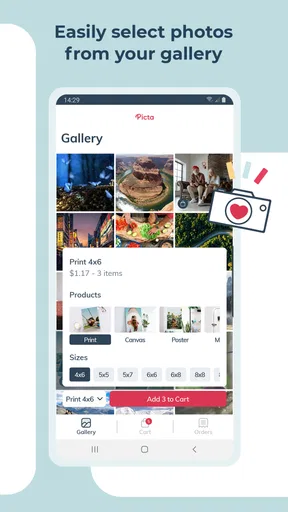
After using it, my impression is that its value depends less on creative controls and more on convenience. It is most appealing when a nearby CVS location is part of your normal routine and you want tangible photos today rather than an online order that arrives later. The app supports familiar formats such as 4x6, 6x6, 5x7, 6x8, 8x8, and 8x10, so it can handle ordinary snapshots as well as a few square and larger presentation choices.
What I would consider before installing it
The first decision is not whether the app has enough buttons. It is whether same-day pickup solves a real problem for you. If you are preparing a birthday display, putting together a small memory board, or printing a few pictures before visiting family, speed and location matter more than advanced filters. In that context, this app feels focused rather than limited.
I would also think about the kind of photos I normally take. A phone gallery often contains screenshots, duplicates, cropped social-media images, and pictures with different orientations. A print app has to turn that messy collection into physical items, and that is where judgment is needed. The available sizes are useful, but they do not remove the need to check how a portrait image will sit in a rectangular frame or how a square crop changes the composition.
The app is free, and its content rating is Everyone, which makes it approachable for households where different people may help choose images. It runs on Android from version 8.0 onward. That broad compatibility is practical if you are using an older phone as a shared family device, although the experience will naturally depend on the phone’s screen, storage, and photo library.
Its popularity also gives some context. The app has an average rating of 4.8 from around 13 thousand ratings, with roughly 2.4 thousand written reviews, and it has passed 100 thousand installs. I see those figures as a sign that the basic print-and-pickup idea is landing well for many users, not as a guarantee that every order will feel effortless. Printing involves image quality, cropping choices, store handling, and pickup timing, so the practical details still deserve attention.
My first workflow: choose the occasion before the images
One useful habit is to decide the purpose of the prints before opening the gallery. For a photo album, I would favor consistent 4x6 prints and select images that work in the same orientation. For a wall or desk display, I would consider square options such as 6x6 or 8x8 when the pictures already have a centered composition. For a single portrait or family group, a larger format can make more sense, but only if the original image has enough detail.
This sounds obvious, yet it prevents one of the most common mistakes in mobile printing: selecting pictures first and thinking about the physical arrangement later. The app gives me several sizes, but the best choice is tied to how I will use the prints. A mixed order can be convenient, though it may also look visually inconsistent if the pictures are meant to form one display.
I would also leave time to inspect every crop. Phone cameras often capture images in proportions that do not match a chosen print size. A picture can look balanced on the phone and lose a person’s head, a pet’s paws, or an important background detail when fitted to paper. My advice is simple: treat the preview as a composition check, not merely a confirmation that the right file was selected.
Where the app wins over ordinary alternatives
The strongest advantage is the connection between digital selection and local, same-day printing. Compared with keeping photos only on a phone, the app turns a few taps into something I can hand to someone, place in a frame, or use for a small personal project. Compared with ordering prints through a service that ships them, the local route is better when waiting is the main inconvenience.
That distinction matters in everyday situations. Imagine I am leaving for a family visit in the afternoon and realize I want to bring a few recent pictures for a relative. I can select a manageable group, choose a size suited to a small album or frame, and use the CVS pickup model rather than postponing the idea. The app is not trying to replace a professional photo lab in that moment; it is solving the “I need ordinary prints today” problem.
It is also more approachable than a desktop-oriented photo workflow. I do not need to transfer images to a computer, arrange them in a page layout, or learn a separate ordering system. For casual users, that reduction in steps is meaningful. The app’s job is narrow enough that I can understand the purpose immediately.
The range of formats gives it more flexibility than a service limited to one standard snapshot. The familiar 4x6 remains the sensible default for albums and everyday sharing, while 5x7 or 8x10 can suit a frame or a more prominent portrait. Square choices are particularly useful for images originally composed for social platforms, though I still would not assume that every social image will print cleanly just because its shape is square.
Another strength is that the app can fit into a repeatable household routine. Someone might use it after a vacation to make a small selection, after a child’s event to share pictures with grandparents, or before a school presentation that needs physical images. Once I know which sizes work for my frames, the next order becomes less of a design decision and more of a quick errand.
Three practical insights that are easy to miss
First, same-day printing rewards restraint. I get better results when I choose the strongest images instead of sending an entire camera roll. A small, intentional set is easier to review for orientation, faces, and duplicates. It also makes pickup less confusing than a large mixed batch with no clear purpose.
Second, the largest available option is not automatically the best option. An 8x10 print gives a picture more visual presence, but it also exposes softness, motion blur, and aggressive phone cropping more clearly. I would reserve larger formats for images that already look crisp when zoomed in, and use smaller prints for casual snapshots where minor imperfections are less noticeable.
Third, square printing should be treated as a creative crop rather than a neutral format change. A landscape photo may lose context, while a portrait may become cramped. I find square sizes most useful when the subject is already centered or when the background is not essential. If the story of the image depends on what sits at the edges, a rectangular size is usually safer.
These choices are not advanced features in the traditional sense, but they are the difference between a print that feels intentional and one that looks like a phone image forced onto paper. The app makes ordering accessible; the user still supplies the final bit of visual judgment.
What the developer’s focus means in practice
Pictarine - Printing Photos is clearly concentrating on the bridge between personal photography and physical output. That focus is helpful because I am not distracted by a large catalog of unrelated editing tools. I open the app with a concrete task in mind: select pictures, decide on formats, and use the CVS Pharmacy Photo Print route.
The trade-off is that people looking for extensive image correction may feel they are in the wrong category. If I need detailed color work, layers, retouching, typography, or a carefully designed collage, I would rather prepare the images elsewhere and use this app only for the printing step, if that workflow suits my needs. Its strength is not replacing a dedicated editor; it is making a basic physical print order less cumbersome.
Where another kind of service may fit better
The best alternative depends on what I value most. If price comparison and delivery convenience matter more than speed, a shipping-based photo service may be a better match. It can be more suitable when I am ordering a larger collection, planning ahead, or sending prints to someone who does not live near a CVS location. I would not choose a same-day local workflow simply because it is available if I have no nearby pickup option or no urgent reason to collect the photos.
A dedicated editing app is preferable when the images need serious preparation. For example, if a picture is too dark, has distracting objects, or needs text added for an event, I would edit it first rather than expect a print-ordering app to solve every visual problem. The useful compromise is to prepare a finished image in an editor, save a clean copy, and then bring that copy into the print workflow.
For creative projects, a collage or design platform may also be a better starting point. A scrapbook page, invitation, poster, or multi-image layout needs control over spacing and typography. The print sizes offered here can support a finished design, but the app is not the same thing as a full layout studio. I would use the tool that matches the object I am trying to make, not force every project into a simple photo order.
There is another important exception: archival or professional work. If exact color consistency, fine paper choices, or specialized finishing are central to the job, a local same-day print workflow may not be the right standard. This app is aimed at accessible everyday prints, not at replacing a specialist lab for exhibition images or commercial photography.
Even within ordinary use, location is a deciding factor. The CVS connection is a benefit when the store is convenient, but it becomes friction when the nearest location is out of the way. The time saved in ordering can disappear during the pickup trip. I would check my actual travel routine before assuming that “same day” means “more convenient.”
How I would avoid disappointing results
I would start with the original camera image whenever possible, not a screenshot downloaded from a messaging app. Re-saved images can be compressed, and that loss becomes more visible on larger prints. If someone sent me a picture through a chat, I would ask for the original file when the image matters, especially for an 8x10 print.
I would group my selections by purpose and size rather than mixing everything together. A set of 4x6 vacation photos, a few square social-style pictures, and one larger portrait can all be useful, but each group deserves its own visual check. This approach helps me notice when an image needs a different crop or when a frame will not match the selected format.
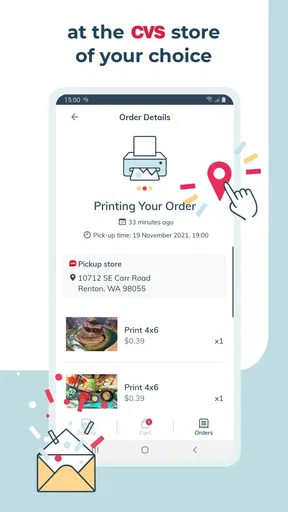
I would also avoid making a last-minute order without checking the store side of the plan. Same-day convenience is valuable, but I still need to allow time for the order to be prepared and for me to reach the location. The app makes the selection process easier; it cannot eliminate the practical step of collecting the prints.
For family use, I would let the person who knows the occasion best make the final selection. A technically sharp photo is not always the emotionally important one, and a print order can become unnecessarily large when everyone adds “just one more.” A shared shortlist keeps the experience quick and makes the finished set feel more deliberate.
The real cost of switching to this workflow
Because the app itself is free, the main cost of switching is not learning a subscription system or buying special equipment. It is changing how I handle photos. Instead of leaving images in a gallery, I have to make decisions about format, crop, quantity, and pickup. That is a small investment for occasional printing, but it can feel like extra work if I only want to browse memories digitally.
There is also a mental cost in separating “good on screen” from “good on paper.” A phone hides some softness because the image is small and luminous. A physical print is less forgiving. I need to inspect faces, edges, shadows, and the overall crop before confirming an order. Once that habit becomes routine, it takes little time, but the first few orders may involve more checking than expected.
The app’s current version is 10.46.0, and its release history began on November 9, 2019. I mention that because the product is not a brand-new experiment; it has had time to develop as a focused printing tool. Still, version numbers do not tell me whether every individual store experience will be identical, so I judge it by the usefulness of the workflow rather than by the number attached to the app.
Switching from a delivery service can also change how I plan. Local pickup encourages smaller, more immediate orders, while shipping often encourages batching. Neither approach is universally cheaper or better. If I print only a few pictures for an event today, local access is the sensible advantage. If I am preparing a large family album weeks in advance, I would compare the overall effort and delivery options before committing to this route.
For someone already comfortable with a computer-based printing service, the switch may not feel transformative. The benefit is greatest for people who currently postpone printing because transferring photos, choosing sizes, or waiting for delivery feels like too much trouble. In that case, the CVS-centered workflow removes enough friction to make physical photos more likely to happen.
My recommendation depends on the occasion
I recommend Picta x CVS Photo Print to anyone who wants straightforward physical photos without waiting for shipping, especially when a CVS location is already part of the day’s route. It is a sensible choice for family snapshots, small gifts, recent-event pictures, and simple frame updates. The free entry point, Everyone rating, broad Android compatibility, and clear focus make it easy to try without treating printing as a technical hobby.
I would recommend it less strongly to photographers who need exact professional output, people who want extensive editing inside the same app, or users who have no convenient CVS pickup location. Those users may be happier with a specialist lab, a delivery-oriented service, or a dedicated editor paired with a different printing method.
My best advice is to begin with a small, purposeful order. Choose a few original images, match each one to the way it will be displayed, and inspect the crop before confirming. Try 4x6 for a safe album format, use square sizes only when the composition supports them, and save larger formats for images that remain sharp at higher scale. That first order will tell you more about whether the workflow suits your routine than a long feature list can.
In my experience, the app succeeds because it keeps the central promise uncomplicated: move selected phone photos toward same-day CVS pickup. It does not need to be an all-purpose photography studio to be useful. If your priority is turning a few digital memories into physical prints today, this is a practical and approachable option; if your priority is deep editing, specialist quality, or delivery flexibility, another category of service will fit better.
Privacy and Permissions
See what permissions an app requests and how it handles your data.
- Location
- approximate location (network-based), precise location (GPS and network-based)
- Photos/Media/Files
- read the contents of your USB storage, modify or delete the contents of your USB storage
- Storage
- read the contents of your USB storage, modify or delete the contents of your USB storage
- Other
- view network connections, change network connectivity, full network access, control Near Field Communication, run at startup, control vibration, prevent device from sleeping
Verdict
Strengths of Picta x CVS Photo Print
- Easy photo ordering directly from your phone
- Convenient CVS store pickup options
- Supports prints in multiple sizes
- Useful for last-minute photo gifts
- Simple interface for repeat orders
Limitations of Picta x CVS Photo Print
- Print quality can vary between store locations
- Pickup availability depends on local CVS inventory
- Some premium sizes and finishes cost more
- Large uploads may take time on slower connections
- Promotional pricing may require checking current offers
Similar Picks in This Category
View All
Google Photos
Google LLC4.4

Gallery
Google LLC4.2

Picsart AI Photo Editor, Video
PicsArt, Inc.3.9

B612 AI Photo&Video Editor
SNOW Corporation4.1

BeautyPlus-Selfie Photo Editor
PIXOCIAL TECHNOLOGY (SINGAPORE) PTE. LTD.4.5

Remini - AI Photo Enhancer
Bending Spoons4.1
Frequently Asked Questions
What is Picta x CVS Photo Print, and what can I use it for?
Picta x CVS Photo Print is a mobile photo-printing service that lets you select images from your phone and order physical prints through CVS Photo. From the app, you can typically choose print sizes, adjust or crop images, select a nearby CVS location, and arrange pickup or delivery when available. It is designed for quick everyday prints, albums, gifts, and personal projects.
How do I order photo prints through Picta x CVS Photo Print?
After opening the app, you generally choose photos from your device or connected account, select the desired print format and quantity, review the image cropping, and provide pickup or delivery details. Before confirming, carefully check the selected store, estimated completion time, total price, and any applicable fees. Once the order is submitted, the app should provide status information or instructions for collection.
What photo sizes and products are available in the app?
Available options can vary depending on the CVS location, current promotions, and the services supported in your area. Standard photo prints are usually the main offering, while some users may also find enlargements, collages, cards, photo gifts, or other personalized products. The app displays the formats available for your chosen store, so review the product list before uploading and paying.
How long does CVS Photo Print take, and can I pick up my order in a store?
Turnaround time depends on the product, order size, store workload, and whether you select pickup or delivery. Many standard prints may be prepared for same-day or scheduled pickup, but this is not guaranteed for every location or order type. The app normally shows an estimated completion time during checkout. Wait for the ready notification before visiting the selected CVS store.
Are there any important privacy, quality, or payment considerations before using it?
Before ordering, remember that your photos must be uploaded to the service for processing, so you should review the app’s privacy policy and avoid submitting images you are not authorized to print. Print quality can vary with the original resolution, lighting, and cropping, so preview each image carefully. Also verify pricing, taxes, delivery or pickup fees, payment details, and the final order before confirming.
